Migrating from Heroku to AWS
Discover how we ensured a resilient, scalable, and cost-efficient infrastructure for the client's app by migrating it from Heroku to AWS.

Our Customer
IoT-driven Proptech Company
Scale Development (SD) creates custom, interactive digital amenities for new and existing buildings by integrating IoT. Scale Development is an innovative company which uses cloud-based solutions. Scale Development hosted ava-touch application on Heroku paying a high cost for its services. The company needed elastic and scalable infrastructure, which couldn’t be satisfied with Heroku offers. Romexsoft helped to solve these issues by migrating web app to AWS.
The Challenge
High Hosting Costs and Limited Scalability
Scale Development utilizes multiple technologies to advance its offering. To host the ava-touch app in the Heroku cloud, the company had to pay high prices for the services without getting enough benefits of it. At the same time, it would be less expensive and easier to manage the assets in AWS. AWS offers services that allow Scale Development to get desired elasticity, scalability and easy management of its cloud infrastructure.
The Solution
Migrate from Heroku to AWS
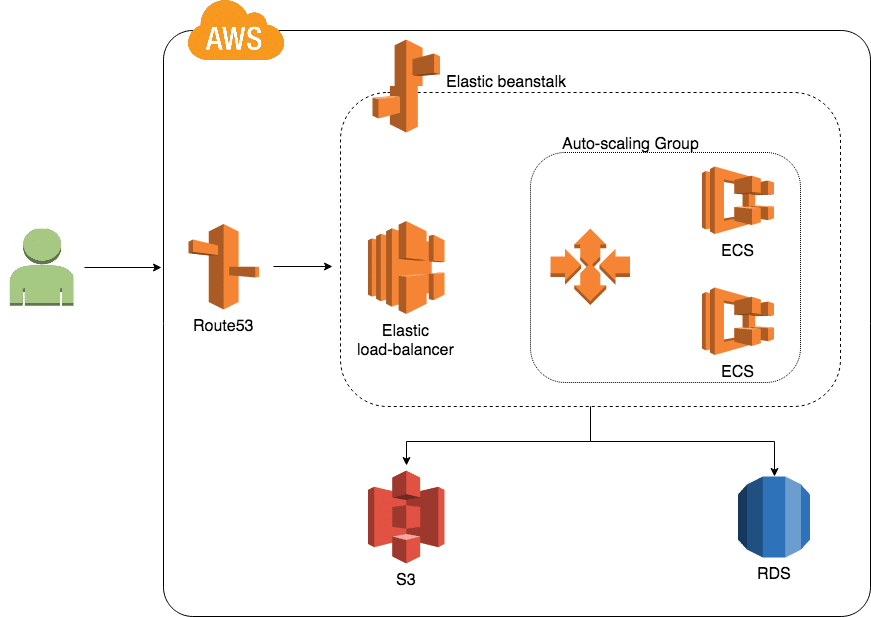
Being a AWS migration services vendor, Romexsoft did professional expertise of ava-touch software and environment and quickly conducted a plan of migration to AWS with its infrastructure design.
Scale Development AdTech SaaS Platform AWS Architecture Diagram
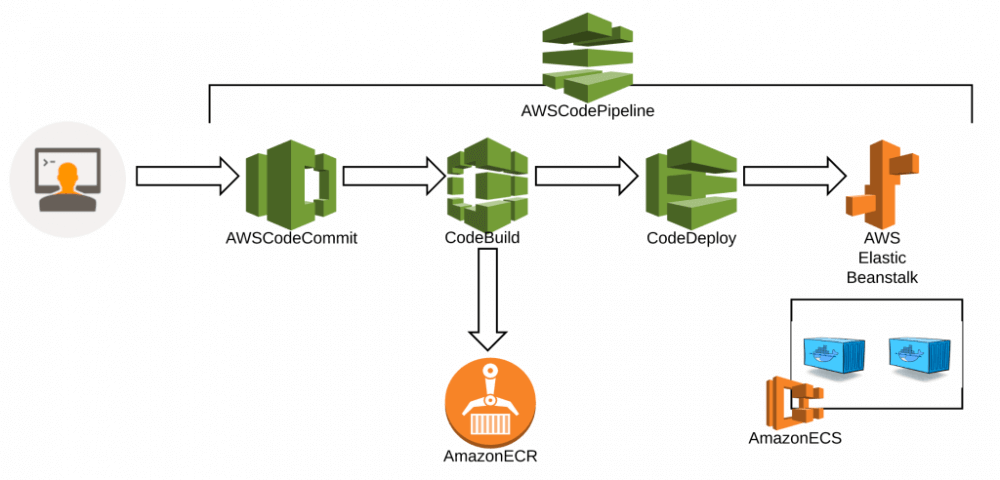
DevOps Automation reflecting CI/CD processes was implemented by CodePipeline:
- CodeCommit
- CodeBuild
- CodeDeploy


The Results
Cost-Effective Cloud Migration
As a result, the environment of the ava-touch app was deployed in AWS without downtime. Scale Development paid half as much, and a scalable system’s architecture made the application ready for high load. Romexsoft implemented Elastic Beanstalk Service (EBS) which gives SD the opportunity to easily manage its web app environment. Romexsoft and SD continue working together. Romexsoft improves migrated web app source code. Moreover, the partner is going to develop other web apps implementing Serverless and Lambda AWS services there.


Frequently Asked Questions
How do you guarantee data integrity and define a rollback path during cutover?
The team protects data integrity through pre-cutover validation, controlled synchronisation, and a clear rollback plan. Before the cutover, the AWS environment runs in parallel while Heroku remains the source of truth. The team synchronises data using replication or export/import and verifies consistency with row counts, checksums, and application-level tests. During the final sync, the team pauses writes or queues them briefly to prevent drift. The rollback path is defined in advance. Heroku stays unchanged until the AWS environment proves stable in production. If issues appear after cutover, traffic is redirected back to Heroku immediately using the last consistent dataset.
How is near-zero downtime achieved and validated before traffic is fully switched?
Near-zero downtime is achieved through parallel environments, controlled traffic switching, and pre-cutover validation. The AWS environment runs in parallel with Heroku and stays fully production-ready before cutover. Data and configuration are synchronised ahead of time, and the team validates application behaviour using health checks, synthetic tests, and real production-like traffic. Traffic is switched using DNS or load-balancer controls in a staged manner. The team monitors error rates, latency, and logs in real time. Only after the AWS environment proves stable is traffic fully moved, keeping any disruption to a short, predictable window.
What security and IAM model replaces Heroku’s managed abstractions without increasing risk?
The setup replaces Heroku’s abstractions with a least-privilege, role-based IAM model aligned with AWS best practices. Access is split by role and environment, not by shared credentials. Applications use IAM roles instead of static secrets, and services receive only the permissions they need to operate. Human access is limited to defined roles with MFA and time-bound permissions. Network isolation through VPCs, security groups, and private subnets reduces the attack surface. Centralised logging and monitoring track all access and changes, providing full audit visibility without increasing operational risk.
How does the CI/CD and developer workflow change compared to Heroku’s Git-based deploys?
The workflow shifts from “push to Heroku and it deploys” to a pipeline-driven release with explicit stages and approvals. Developers still push code to Git, but deployments run through CI/CD stages: build, tests, security checks, and deployment to dev/stage before production. The pipeline promotes the same artefact across environments, which makes releases more repeatable and easier to audit. The team also separates configuration from code more strictly (per-environment parameters and secrets management) and adds controlled rollout options such as blue/green or canary deployments.